On this page
The game's own HUD is almost entirely hidden: only the minimap stays on screen, and Neonesis draws the rest.
#What's on screen
| Where | What it shows |
|---|---|
| Top left | The server card: its name, how many players are online, your number and your ping. Below it, the current quest card and the chat |
| Right, under the minimap | Two plates: your cash and the money in your account. Notices pop up below them |
| Bottom left | The “Biomonitor” panel: health, armor (if you're wearing body armor), food and water |
| Bottom right | In a vehicle, the “Tachometer”: speed, revs, the tank, the body, the lock and the lamps |
| Above the panel | The green zone icon, the voice and range indicator, your faction card while on duty, the job card |
| Top center | Handcuffs and jail time, trade and carry offers, test drive |
| Bottom center | The prompt at places where you can do something, the action's progress bar and the key hints |
| Above players | Their name (or “Stranger” with a number), number and distance. The tag is fully visible within 22 m and fades out beyond that |
#The Biomonitor
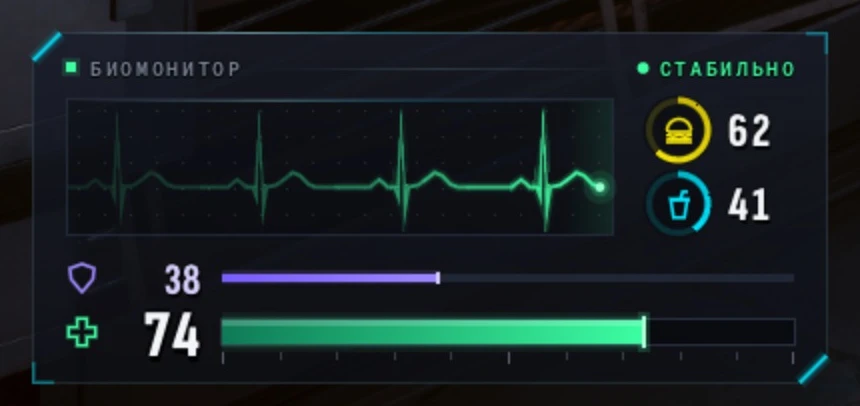
- At the top, your character's state: “Stable”, “Wounded”, “Critical” or “Unconscious”.
- In the middle, a live heart trace: a wound makes it jolt, and it beats faster when your health is low.
- On the right, two rings with their figures: food and water.
- At the bottom, health as a big figure and a bar, with a thin violet armor bar and its figure above it.
- Below 25 health the panel turns red. While you're knocked out, the health figure turns into the countdown to the hospital.
- If you're away from the keyboard, “YOU'RE AWAY · Your time doesn't count” shows above the panel: see Character and name.
#Money
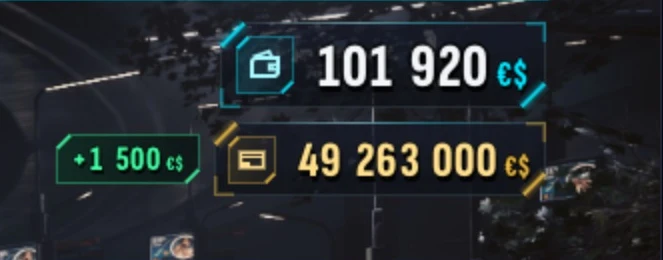
- Under the minimap, two plates: your cash with a wallet icon and the money in your account with a card icon. Always shown.
- When a sum changes, its figures roll, the plate's edge flashes green (money in) or red (money out), and the change itself pops up next to it for a moment.
When your character is knocked out, the screen goes dark and shows how long until you wake up in the hospital.
#The Tachometer
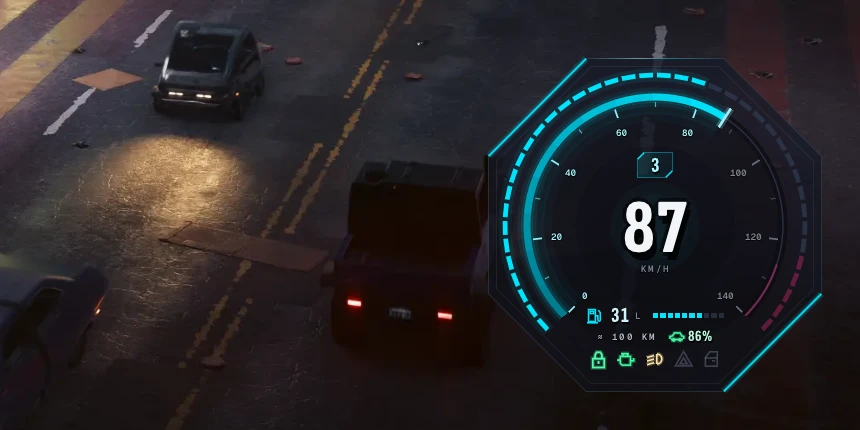
The game's own speedometer is hidden on the server. While you sit in a vehicle, the “Tachometer” lights up in the bottom right:
- In the middle, your speed in km/h with the gear above it: its number, R only while the car is actually rolling backwards, and N while it stands still. The scale runs a little past the vehicle's top speed.
- The outer ring shows the revs: it turns yellow at high revs and magenta at the red line.
- At the bottom, the tank: liters (kWh for an electric car) and a bar, with the range and the body's condition in percent under them. The body turns yellow below 55% and red below 25%.
- At 15% of fuel the range gives way to a yellow “Fuel low”, at 5% to a red “Fuel on reserve”, and with the tank empty to “Tank empty”, while the dial's edges pulse red. An electric car says “Charge low”, “Battery nearly flat” and “Battery flat”.
- When a company, the city or the corporation pays for the fuel, it says “Company fuel”, “City fuel” or “Corporate fuel” there.
- Along the bottom, the lamps. First, a little larger than the rest, the lock: green when the vehicle is locked, magenta when it's open. Then the engine (lit while it runs, pulsing red when the tank is empty), the headlights (low or high beam), the hazard lights (blinking while on) and an open door, trunk or hood.
- A passenger sees only the lock, the speed and the tank.
- While your phone is open over it, the Tachometer fades out.
#The main window
It opens with Delete. Only one window is open at a time, and it's always in the center of the screen.
| Tab | What's there |
|---|---|
| “Server” | The address, the name you connect with, the server password (if it has one), the message of the day and the “Disconnect” button |
| “Character” | Picking and creating characters; while you play, the character card, work record, police record and name change |
| “Faction” | Your rank, duty and pay, the members, the base, the treasury, and for the police, the wanted list and calls. Only shows while you're in the game |
| “Players” | Who's on the server right now: number, name (if you've met) and ping |
| “Settings” | Language, spawn point, scale, sound, voice chat and keys |
#Settings
F2 opens the “Settings” tab directly.
- Language: English or Russian. English is the default.
- Where you appear: “Where I left”, “The city's spawn” by the Bank of Night City, or “My home”. More in the Housing section.
- Interface scale from 0.8 to 2, and a separate HUD scale from 0.75 to 2.
- Chat over the game and notices: on or off.
- Music on the loading screen and its volume.
- Controls: the Neonesis keys and the on-screen key hints. See the Key settings page.
- Voice chat: turn it on or off, pick your microphone, set the volume of other people's voices (up to 200%) and your own microphone level (up to 300%). A live level meter shows next to it.